
Why Microsoft 365 Matters
I’ve spent the last five years working with Microsoft 365, supporting nonprofits and small businesses through different projects.
For many small and growing businesses, the right technology can be the difference between progress and frustration. Microsoft 365 brings together communication, collaboration, and security in one place. It allows organizations to simplify their IT setup without sacrificing performance or protection.
Over time, I saw how much this platform can impact the way organizations work, from small teams to large enterprises. Microsoft 365 can make a real difference in how people collaborate, manage security, and stay productive.
What started as side projects turned into a deep dive. I wanted to fully understand what makes Microsoft 365 such a powerful tool. That led me to spend time in hands-on labs, take advanced workshops, and test real-world setups to see what works best for different business needs.
Some of the key areas Microsoft 365 can help you with include:
- Managing users, licenses, groups, and permissions
- Setting up, configuring, and securing Exchange Online
- Working with Microsoft Entra ID (formerly Azure Active Directory) to control identity and access
- Using PowerShell to automate repetitive tasks and streamline administration
- Improving security and compliance across your organization, including data protection and governance
How does Microsoft 365 keep business data secure and compliant?
Microsoft 365 is built with security and compliance features that protect an organization’s data at every level. It uses multiple layers of defense, including:
- Multi-factor authentication (MFA) adds an extra step to confirm a user’s identity before they can sign in.
- Data loss prevention (DLP) helps stop sensitive information, like customer or financial data, from being shared outside the organization.
- Encryption protects data both when it’s stored and when it’s being transmitted.
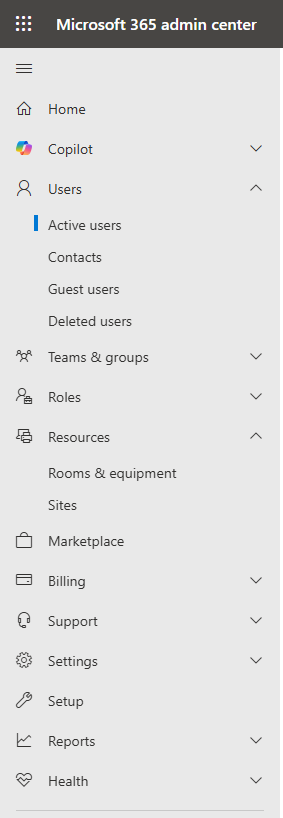
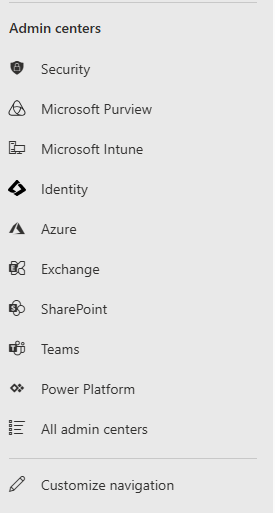
Introduction to M365 admin center: Overview
Understanding the Admin Centers
In summary, there are two main sections inside the Microsoft 365 admin portal (Home and Admin Centers)
- Home tab: gives you a quick overview with key areas like Copilot, Users, Billing, and more.
- Admin Centers: include specialized management areas such as Security, Intune, Exchange, SharePoint, and others for deeper control and configuration.
These sections give administrators a full view of their organization’s Microsoft 365 environment,from user management to security and compliance.
Problem solving as administrator: My approach
In any IT or Microsoft 365 role, success starts with strong habits. Before taking action, slow down and think carefully about the situation.
Key habits to build include:
- Stop, analyze the problem before reacting and understand the root cause.
- Document your work to keep consistency and accountability.
- Follow best practices for security and compliance to protect data and meet organizational standards.
- Communicate professionally with users by being clear, and patient.
- Educate users when possible on recurring technical issues so they can handle simple problems themselves and avoid unnecessary support calls.
Need help managing your Microsoft 365 environment or your IT? Connect with me today!
my blog:https://hackswire.com/blog/