
I am currently the M365 administrator for a small organization. As a side project, I also set up and support Microsoft 365 for small businesses. I don’t have a technical team to escalate to when a difficult technical issue comes up.
The most challenging areas I’ve faced are Entra ID issues such as MFA, Conditional Access, and sign-in risk.This is why I decided to upskill Microsoft Entra ID to better understand the overall Microsoft 365 security posture.
I am working through the following areas:
Section 1: Modern identity attacks
Section 2: Weak identity setup
Section 3: MFA authentication
Section 4: Conditional Access
Section 5: Device-based access controls
Section 6: Identity Protection
Section 7: Conditional Access app control
Section 8: Authentication and sign-in troubleshooting
Section 9: Identity attacks ( practical simulation)
Modern identity attacks
I implemented, tested, and validated unrestricted sign-in behavior and explored modern identity attacks targeting Microsoft Entra ID.
Modern identity attacks!
In the past, many attacks focused on exploiting network infrastructure, bypassing firewalls, targeting web servers, and compromising other infrastructure components to gain access to organizational resources. As companies changed the way they deliver their resources such as Microsoft M 365 rather than on premises, the users can access company resources from home, airports and coffee shops and attackers shifted their focus too. They now target user identity and accounts through stolen credentials, password spray, phishing campaigns, or social engineering.
The misconception I come across in small business! We have MFA enabled so we have enough protection!
Identity cycle Attack!
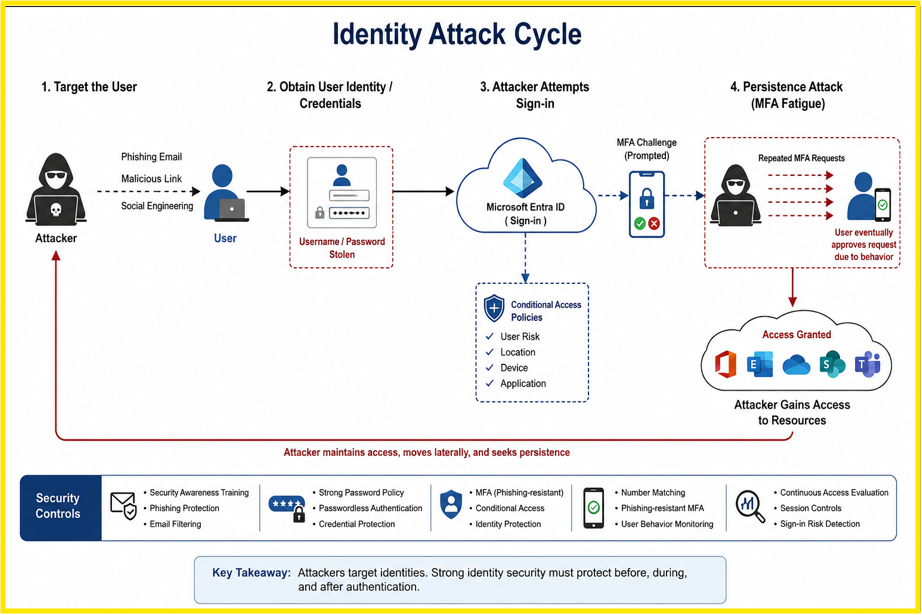
The wide range of attacker authentication threats:
- Password spraying
- MFA fatigue
- Phishing campaigns
- Token theft
- Session hijacking
Weak set up:
Finding: Incomplete Security Configuration ( Security Defaults Disabled)
The tenant’s security posture is currently weak due to a misconfiguration. Security Defaults has been disabled, and no equivalent protection (such as Conditional Access policies) has been fully implemented to replace it. As a result, users are able to sign in with only a username and password
The user signs in directory to company resources, this is the unrestricted sign sin.
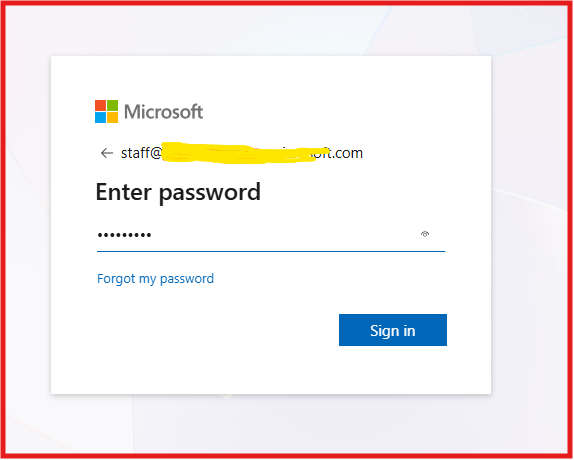
With no additional verification required, an attacker who obtains valid credentials can sign in exactly as the legitimate user would.
This misconfiguration significantly increases the risk of unauthorized access to organizational resources. This is a huge risk!
MFA scenario!
Imagine your organization has Multi-Factor Authentication (MFA) configured, but it isn’t enforced during sign-in. With Security Defaults disabled and no Conditional Access policy requiring MFA, users can authenticate using only their username and password, leaving accounts vulnerable to compromise.
If an attacker obtains a user’s credentials through password spraying, password reuse, password guessing, credential theft, or phishing, they may be able to authenticate successfully. If Multi-Factor Authentication (MFA) is not enforced and Conditional Access policies are not configured, the sign-in is evaluated only against the username and password.
There are no risk-based access decisions based on factors such as user risk, sign-in risk, device compliance, location, or application sensitivity.
Identity verification is the process of confirming that the person signing in is the legitimate account owner:
- The authentication cycle:
- The user signs in.
- Entra ID verifies the credentials.
- Entra ID issues a token for the session.
- The user accesses apps using that token until it expires.
- Once the token expires, Entra ID re-evaluates access based on organizational policy, and re-authentication may be prompted.
Preparing and implementing MFA.
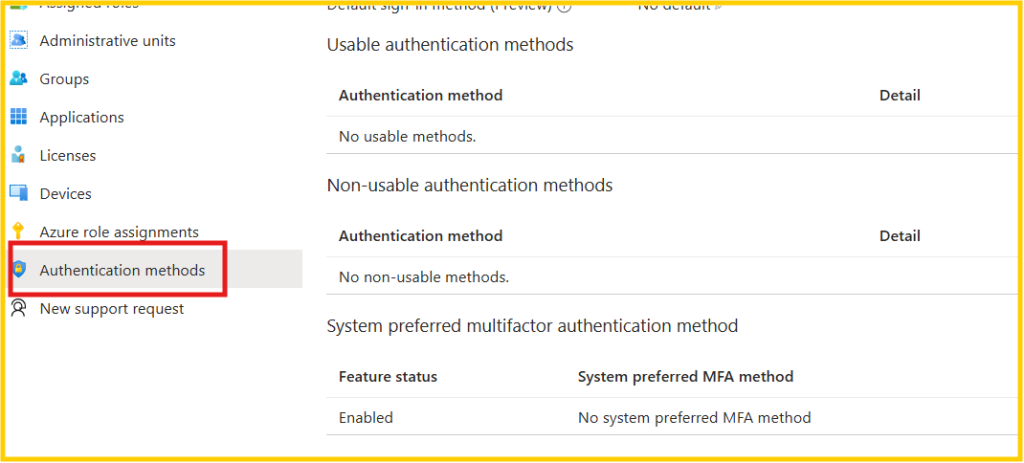
Take a look at the screenshot below!
Do you think this configuration will trigger an MFA prompt?
This is a common misconception among admins, MFA alone is not sufficient. It is one control within a broader, layered defense strategy.
As shown below, MFA being ‘enabled’ at the admin level is misleading. Without a Conditional Access policy specifying enforcement conditions and target scope (users/groups), MFA is not actually triggered during sign-in.
Top 3 Most Common Identity Attacks:
- Password spray. Attackers try a small set of common passwords across many accounts, staying under lockout thresholds to avoid detection.
- MFA fatigue. Attackers repeatedly send MFA prompts until the user approves one out of frustration or confusion.
somepoint users may approve mfa request that they didn’t initiate as the attacker targets humans rather than the technology. Microsoft added number matching on top of the mfa request that showed both screen mobile and other devices.
- Token theft. Attackers steal a valid session token, bypassing the need for a password or MFA entirely. For example, a user logs into Microsoft 365 from a corporate laptop. Behind the scenes, Entra ID issues a session token so the user doesn’t have to re-authenticate on every request.
The organizations can reduce mfa
Key Takeaways on Modern Identity Attacks:
- Strong authentication is necessary. Strong passwords and MFA are the baseline, but not enough on their own. Conditional Access should be required before any access is granted.
- Conditional Access evaluates signals in real time: sign-in risk, location, and device compliance, then decides whether to allow, block, or require step-up authentication.
- Least privilege. Give users the exact permissions they need to do their job, nothing more. This limits what an attacker can do even if an identity is compromised.
- Zero Trust: assume breach ( Never trust, always verify)Design controls as if an attacker is already inside, not just trying to get in.
- Continuous identity monitoring. Helps organizations catch suspicious activity at an earlier stage, before it turns into a full compromise.
We covered section 1, 2, and 3 here.
MFA is essential, but it is not the finish line. I explored modern identity attacks against Microsoft Entra ID to understand how attackers exploit compromised credentials and why organizations need layered identity protection!
Previous Entra ID blog
My Technical Blog
Eng. Muhidin Warsame,